
Klassik: The KDE 3 Desktop Returns on Plasma 6

KDE is bringing back even more nostalgia: the Klassik project ports the KDE 3 desktop to Plasma 6. It is built with Qt 6 and Qt Quick and supports Wayland and fractional scaling.
If you ran Linux in the early 2000s, you know the look: the K menu, the task manager with the little window icons, the digital clock in the corner. Klassik recreates that desktop experience for modern Plasma 6 systems. Not as a theme: the panel applets are reimplemented in C++ and QML. They are drawn with QStyle and QPainter to stay as close to the originals as possible. Included so far:
- K Menu (application menu)
- Quicklaunch
- Task manager
- Lock / log out buttons
- Digital / analog clock
The panel uses a custom KDE 3-style containment that draws its background with QStyle and QPainter, including support for custom background images.
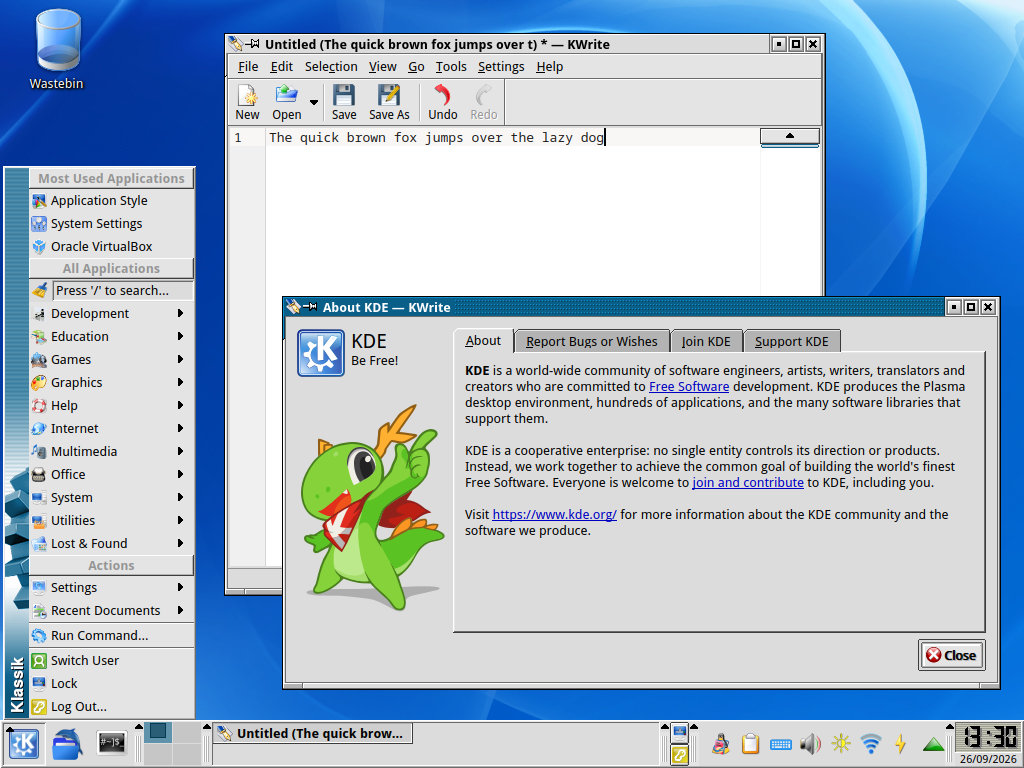
Klassik goes beyond the panel as well: the KDE 2/3 application style has been rewritten for Qt 6, the old KDE 3 KWin window decorations have been ported to KDecoration3. The KDE 2 decorations are included as well. It also includes a selection of the original KDE 3 color schemes for Plasma and some of the wallpapers that shipped with KDE 3.
Installation
Klassik is built from source:
git clone https://github.com/neeeeow/Klassik.git
cd Klassik
cmake -B build -DCMAKE_BUILD_TYPE=Release
cmake --build build
sudo cmake --install build
Then select Klassik under System Settings, Colors & Themes, Global Theme. Check "Desktop and window layout" before applying: that is the option that loads the Klassik panel.
The README includes one important warning: clone the master branch, because the develop branch contains unstable work in progress. Compiling requires Qt 6, KDE Frameworks 6, and the Plasma 6 libraries. The project is GPL-3.0 licensed, and at the time of writing the repository shows 136 stars and 178 commits, all by the same developer.